 Pensile
Keep what you're looking at in view.
Capture anything on your screen and it floats right where you took it. When you're done with it, it hangs on a line along the top of your screen, until you need it again.
Capture it. Mark it. Hang it up.
Three steps, all of them a keystroke or a drag away, from whatever app you're in.
Capture
Press ⌘⇧2 and drag over anything, click a window, or take a whole display. The picture is taken the instant you press the keys, open menus and all.
Mark it up
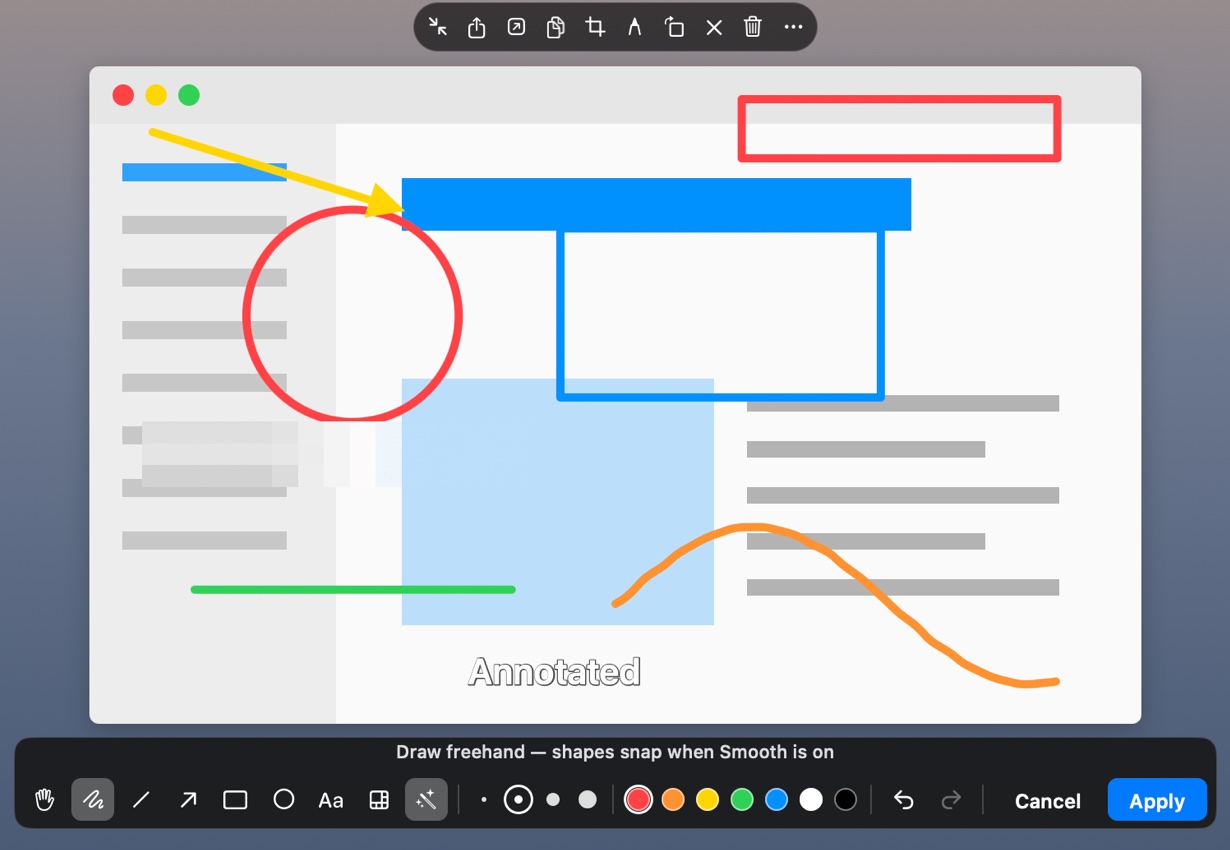
It lifts off the screen right where it was, floating above every window. Circle, point, write, blur what's private, crop. Shapes you draw by hand snap into clean ones.
Hang it up
Leave it, or press ⌘M, and it hangs itself on a line across the top of your screen. Click the pile to spread it out; pull any print down to see it large again.
Everything you pinned, on one line



A small app that stays out of your way
Pensile lives in the menu bar. No window to manage, no library to organise: what you pinned is where you left it.
Capture anything
An area, a window with its rounded corners kept clear, or a whole display. Saved as PNG in the folder you choose.
Mark it up
Seven colours, four weights, text that wraps as you type, mosaic for secrets. Move any mark afterwards, or revert to the original.
The line
Spread it, scroll along it, gather it in a corner or put it away behind a tab. Pin its end to keep it out; pull the pin and watch it fall.
Files, not just pictures
Drop any file on the line, or send it from the Finder. PDFs, documents, films and songs open in a live preview in their own frame.
Sticky notes
Seven papers and six hands, handwriting to typewriter. Each note is a plain text file you can open anywhere.
Private by design
No account, no analytics, no tracking. Nothing you capture, pin or write ever leaves your Mac.
Try it free. Then pay once, or by the year.
Pensile is a free download with a 14-day free trial of everything. After that, keep it with a purchase inside the app: all of Pensile, on every Mac you use, for your whole family.
Yearly
A small price, renewed each year. Cancel whenever you like in your App Store settings.
- Everything in Pensile
- All updates while subscribed
- Family Sharing
Lifetime
Buy it once and keep it. Costs less than three years of the yearly plan.
- Everything in Pensile
- All future updates
- Family Sharing
Bought in the app, through the App Store. Prices in US dollars; the App Store shows yours in your currency.
Good to know
How does the free trial work?
Download Pensile from the Mac App Store and start the 14-day trial from the window it opens with. Everything works during the trial. When it ends, what you've pinned stays right where it is; to capture and pin new things, buy Lifetime or subscribe, inside the app.
Can my family use it?
Yes. Both Lifetime and Yearly include Family Sharing: everyone in your Family Sharing group gets Pensile on their Macs too.
How do I cancel the yearly plan?
In your App Store account settings, under Subscriptions, at least a day before it renews. You keep Pensile until the end of the year you paid for.
Where does Pensile live?
In the menu bar, as a small paper clip. It has no Dock icon and no main window: what you pin floats on the screen or hangs on the line along the top.
Why does it ask for Screen Recording permission?
macOS asks for it before any app can take a screenshot. Pensile uses it only to take the pictures you ask for, at the moment you ask for them.
Where are my screenshots kept?
As PNG files in Pictures › Screenshots, or any folder you choose. They're ordinary files in your folder, and stay there when you take them off the line.
Can the pictures stop floating above everything?
Yes. Turn off Keep pins above other windows and they sit among your windows, coming to the front whenever you use Pensile.
Does it work on more than one display?
Every display gets a line of its own. Move a picture from one to another with a drag or ⌘⇧→, or bring every stack to the display you're on.
What languages is it in?
English, Simplified and Traditional Chinese, Japanese, Korean, French and Spanish.